Leo Speak for your members, clients or staff
You buy a number of personal licences and hand them out to members, clients, residents or staff who are hard of hearing or deaf. Each person gets their own account with a paid plan for a year.
Request a quoteWorks on iPhone with iOS 15 or later and on Android 7.0 or later.
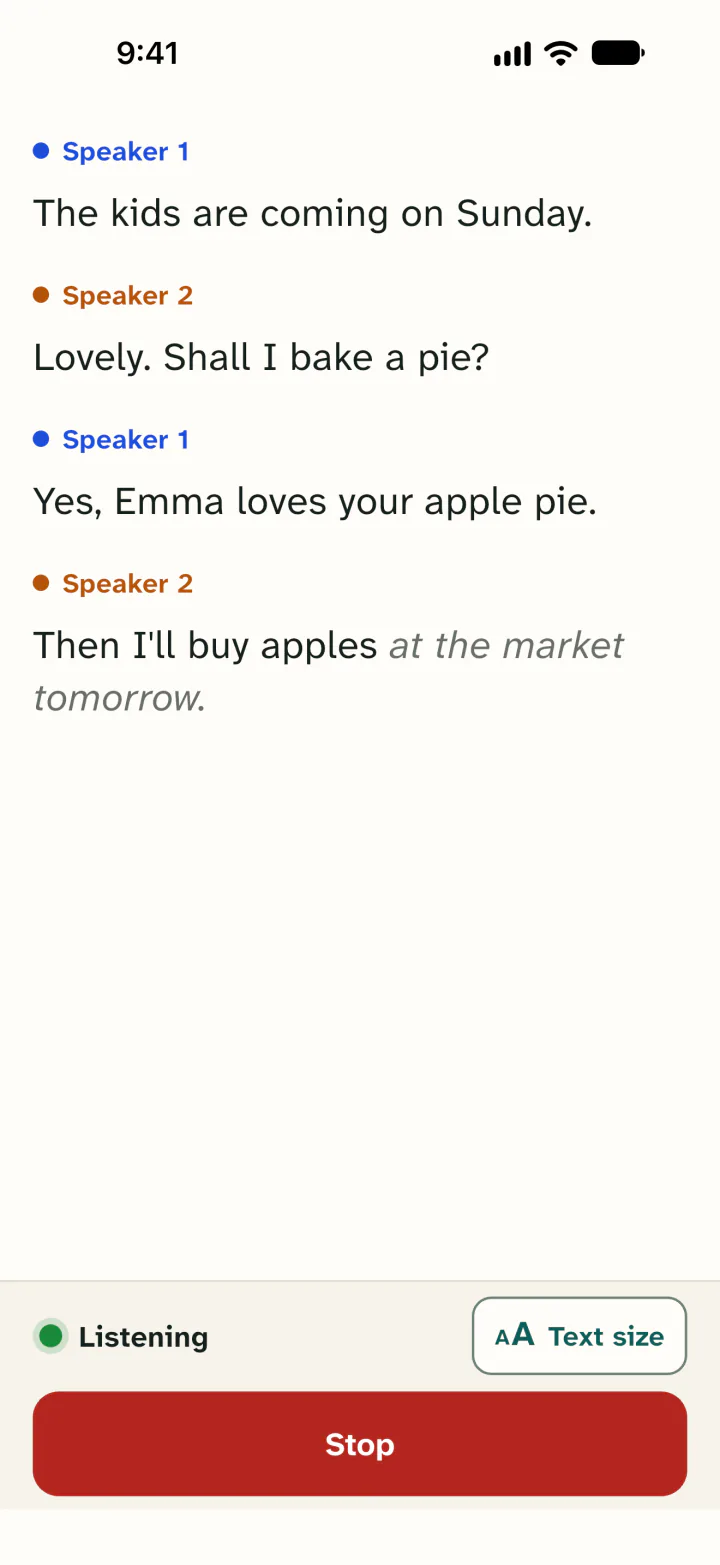
What your organisation gets
- A Leo Speak account of their own for everyone who gets a licence, with a paid plan for a year.
- Live captions of conversations in large text. Each speaker has their own colour, so you can see who says what.
- Conversations translated between two languages on one phone. There are 42 languages to choose from.
- It works on iPhone, on Android and in the browser. People use their own phone or computer. You don't need to buy any equipment.
How it works
Tell us how many licences you need
Fill in the form at the bottom of this page. An estimate is fine.
You get a quote and an invoice
We send you a quote. If you agree, an invoice follows.
You hand out a link or code
Then you get a link and a code to hand out. Each person creates a free account in the app or in the browser and redeems the code on our website.
Who it is for
For organisations that help people who are hard of hearing or deaf, or who want to talk with someone who speaks another language. For example:
- municipalities, for residents
- care and welfare organisations, for clients
- foundations and associations, for members and volunteers
- schools and colleges, for pupils and students
- employers, for staff
Questions
What does it cost?
That depends on the number of licences. Fill in the form and we will send you a quote.
How do we pay?
By invoice. If you need a purchase order number or another reference on it, put it in your message.
How do people activate their licence?
They install Leo Speak on their iPhone or Android phone, or open the web app in the browser, and create a free account. Then they enter the code and the email address of that account at leospeak.app/redeem. The plan is ready straight away.
What happens to the conversations?
Leo Speak does not store audio or text of conversations on its server. To turn speech into text, the audio goes through our server and is turned into text by Soniox within the EU. Conversations can only be saved on the person's own phone, if they choose to. Your organisation does not see the conversations. Read more in our privacy policy.
Request a quote
Tell us how many people you need licences for. We will email you a quote.