Live captions with speaker labels, on the phone you already have
Leo Speak turns what people around you say into large, clear text as they speak. Each speaker gets their own color and label, and you can translate face to face in 60 languages. No new hardware needed.


Works on iPhone with iOS 15 or later and on Android 7.0 or later.
60 free minutes every month in the app, no account needed.
In the browser you get 1 minute to try it without an account. With a free account you get 60 minutes there every month.
What does Leo Speak do in a conversation?
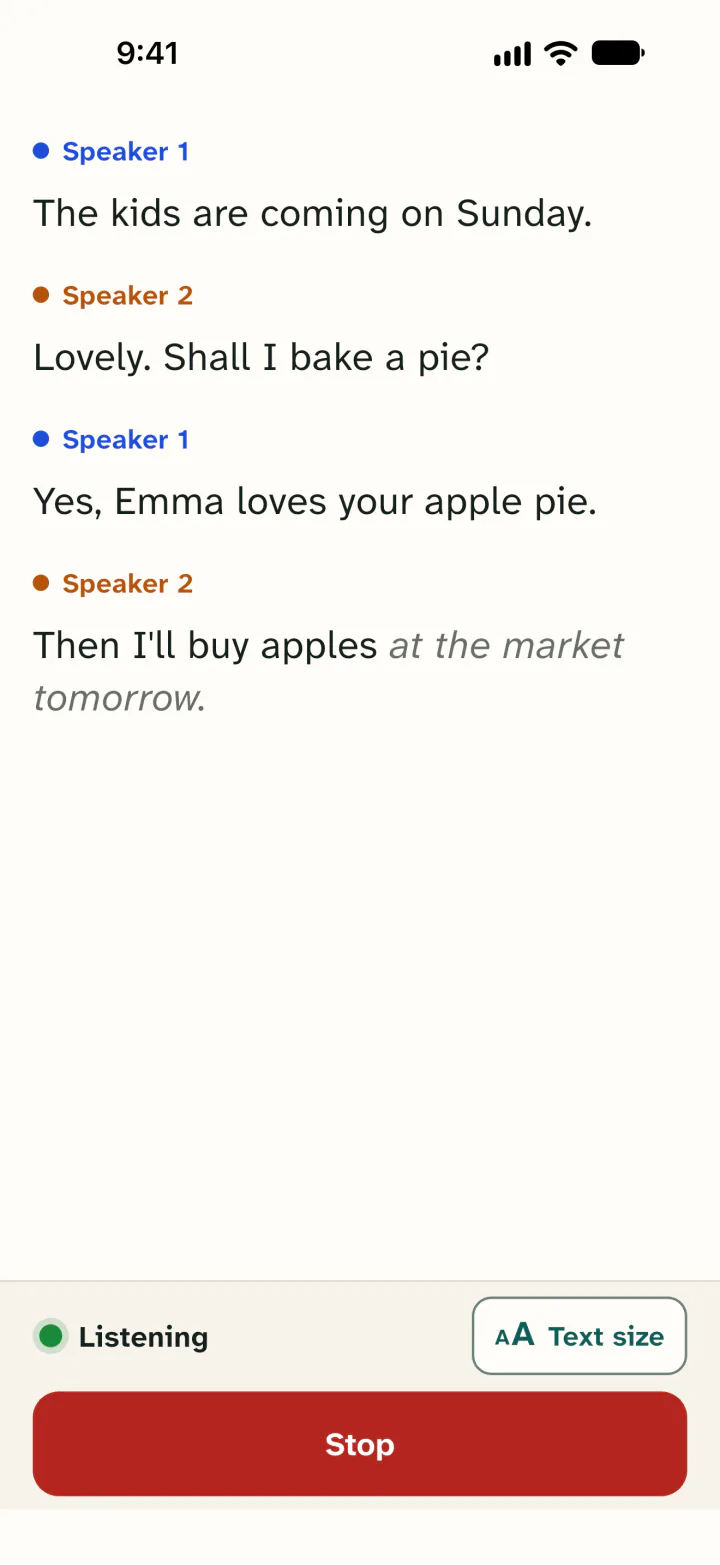
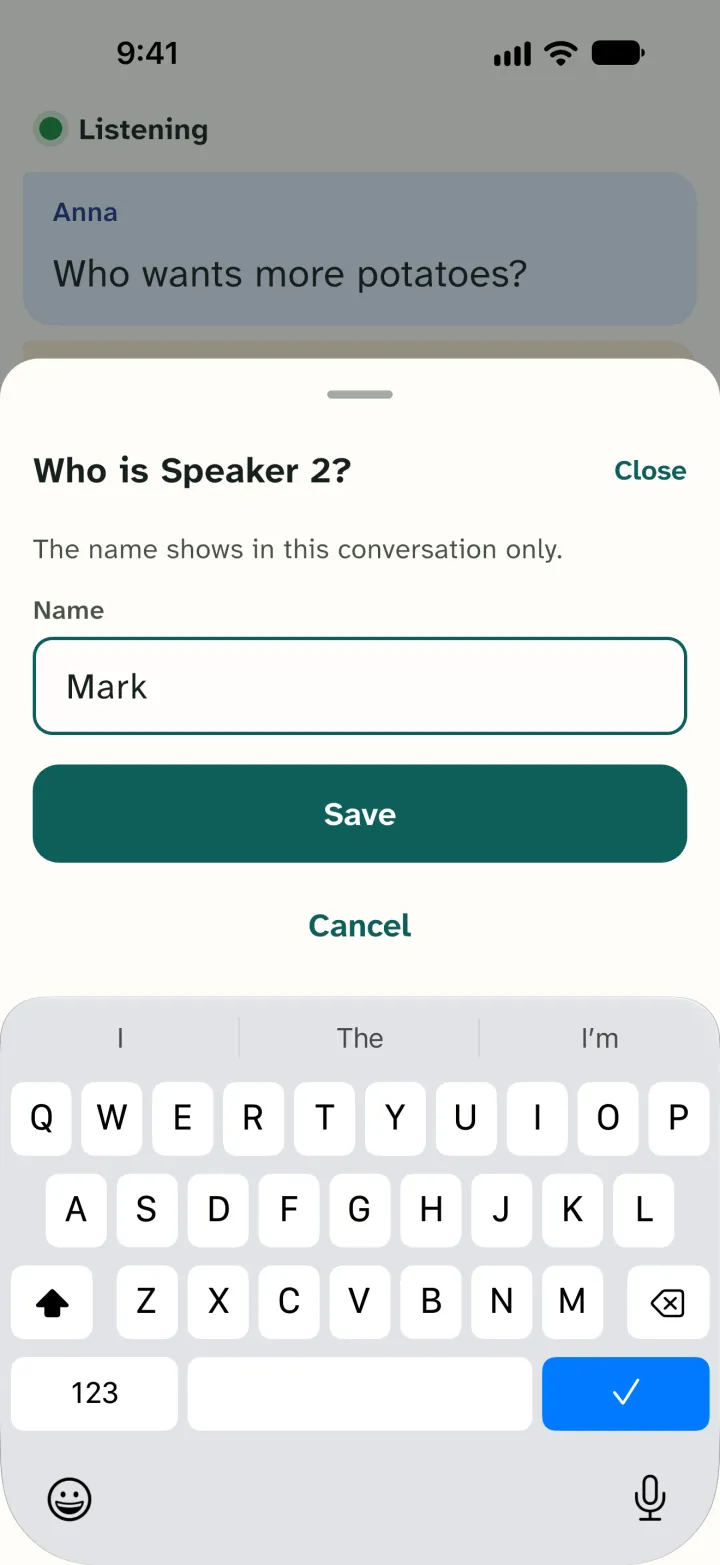
Leo Speak listens through your phone's microphone. What people say shows up as text right away, while they are still talking. Each speaker gets their own colour and a label, like Speaker 2. Tap the label and type a name, and it says Mark instead.
On a phone you can pick one of four text sizes, up to Extra large. The screen stays on while Leo Speak is listening.
It helps, for example:
- at the doctor's, when you don't want to miss the advice
- at a birthday dinner, where everyone talks at once
- at work, in a meeting around a table
- at school, in a talk with your child's teacher
Leo Speak is not made for video calls or TV. It only hears what is said in the room. Teams, Zoom and Google Meet have their own built-in captions, so use those in a video call.
Which languages does it understand?
Leo Speak turns speech into text in 60 languages. You don't pick one first: it works out by itself which language is being spoken. The app itself is available in those 60 languages too.
Leo Speak is made in Nijmegen, in the Netherlands, by Thomas Oomens. If something doesn't work, you email the person who makes it.
It is not perfect. Sometimes a word comes out wrong, or a sentence lands under the wrong speaker. If it's about medicine or a date, check with the person.
Living in the Netherlands?
Then the captions built into your phone may not help you with Dutch. Apple's Live Captions and Google's Live Caption don't list Dutch (checked November 2026). Leo Speak does Dutch, so you can read along at the GP, at a parent-teacher meeting or at the gemeente desk. Want it in English as well? The conversation translator shows each of you the conversation in your own language.
Who is it for?
Hard of hearing
You can hear that people are talking, but not always what they say. Especially in a group, or when someone speaks softly. With Leo Speak you can read back what you just missed. It does not replace a hearing aid.
Deaf
Hearing people just talk, and you read along. It does not replace a sign language interpreter or a live captioner. For an important conversation, ask for an interpreter.
Sudden hearing loss
If your hearing drops overnight, you want to follow what the doctor says today, not in a few weeks. Leo Speak works right away on your own phone. There is nothing to apply for.
For your mum, dad or partner
Install it on their phone together and try it at the kitchen table. The free minutes need no account. Paying for it yourself? Buy the plan in the browser with your own card, then sign in on their phone with the same account.
How it works
Choose Read speech
Open Leo Speak, choose Read speech and tap Start reading. No account needed.
Put your phone on the table
Place it close to whoever is talking. At the top you can see that Leo Speak is listening.
Read along
What people say appears in large text right away. Tap a speaker to give them a name.
Leo Speak and other caption apps
More apps turn speech into text. These are the differences. We checked the language lists and prices on 1 and 4 November 2026, in the Dutch App Store and on each maker's website.
| App | Languages | Cost | Choose it if |
|---|---|---|---|
| Leo Speak | 60, including Dutch | 60 minutes a month free, then from €4.99 a month in the app | you want to read along on iPhone, Android or in the browser and see who says what |
| Live Captions (iPhone) | 8, including English, French, German and Spanish; no Dutch | Free, built into iOS | you have an iPhone 11 or later, speak one of its languages, and want captions in calls and FaceTime too |
| Google Live Transcribe (Android) | More than 80 languages and dialects, according to Google Play | Free | you use Android and also want alerts for sounds, such as a smoke alarm |
| Ava | More than 20; picking the language is paid | Free basic plan with sessions up to 40 minutes; Community €15.99 a month | you join online meetings, or want a group to read along through a QR code |
| Speaksee | Several, including Dutch | Price on request, with a set of microphones | you want a separate microphone for each speaker |
Leo Speak is stronger if you need Dutch on an iPhone, where Live Captions doesn't do it. It runs on iPhone, Android and in the browser, while Live Transcribe is Android only. Translation is included in the free minutes; with Ava you pay for it. You need no extra device, as you do with Speaksee. And of the paid apps, we cost less per month: Light is €4.99, Ava Community €15.99. To be fair, Ava's basic captions are free, in sessions up to 40 minutes.
The other apps have real strengths too. If you speak English and have an iPhone, try Live Captions first: it is free and runs on the phone itself. Live Transcribe is free and works offline on some phones; Leo Speak always needs internet. Ava has a computer app and lets a whole group read along. Speaksee gives every speaker their own microphone.
What happens to the conversation?
We keep no audio and no conversation text on our server. The speech service we use processes the audio in the EU. According to that service, it is not stored or used for training. You can keep a conversation only on your own phone, and only if you choose to. There are no ads in the app. The details are in the privacy policy.
What does it cost?
In the app you get 60 free minutes every month, no account needed. Translation is included.
Need more? In the Netherlands, Light costs €4.99 a month for 10 hours in the App Store and Google Play (November 2026). Store prices differ per country. At full use that comes to €0.50 an hour. In the browser it is cheaper: Light costs €4.49 a month there. Hours you don't use are saved for as long as your plan runs, if you have a free account. You can cancel at any time.
All plans are on the pricing page.
Good to know
- Leo Speak captions what your phone's microphone hears nearby. So put your phone close to whoever is talking.
- Leo Speak is not a hearing aid and does not replace one.
- It is not meant for phone calls, video calls, video or TV.
- In a noisy room a word will come out wrong more often. The sentence around it usually makes the meaning clear.
Questions
Is Leo Speak free?
Every month, 60 minutes are free in the app on your phone, with no account. In the browser you get 1 minute to try it without an account, and 60 minutes a month with a free account. Free minutes you don't use expire at the end of the month.
Does it work without internet?
No. Leo Speak needs internet, over Wi-Fi or mobile data. Conversations you saved on your phone can be read back offline.
Can I read a conversation back later?
Yes, in the app on your phone, if you want to. After your first conversation the app asks whether to keep conversations. They are stored only on your phone, not with us. You can also share a conversation as a PDF or as text.
Can Leo Speak replace a live captioner?
No. A live captioner is a person who types what is said. For a job interview, a court case or a big meeting, book a captioner or an interpreter. In the Netherlands, UWV pays for 30 interpreter hours a year for private use for deaf and hard of hearing people.
Read more
Put Leo Speak on your phone
60 free minutes every month in the app, no account needed.